another update on a software project
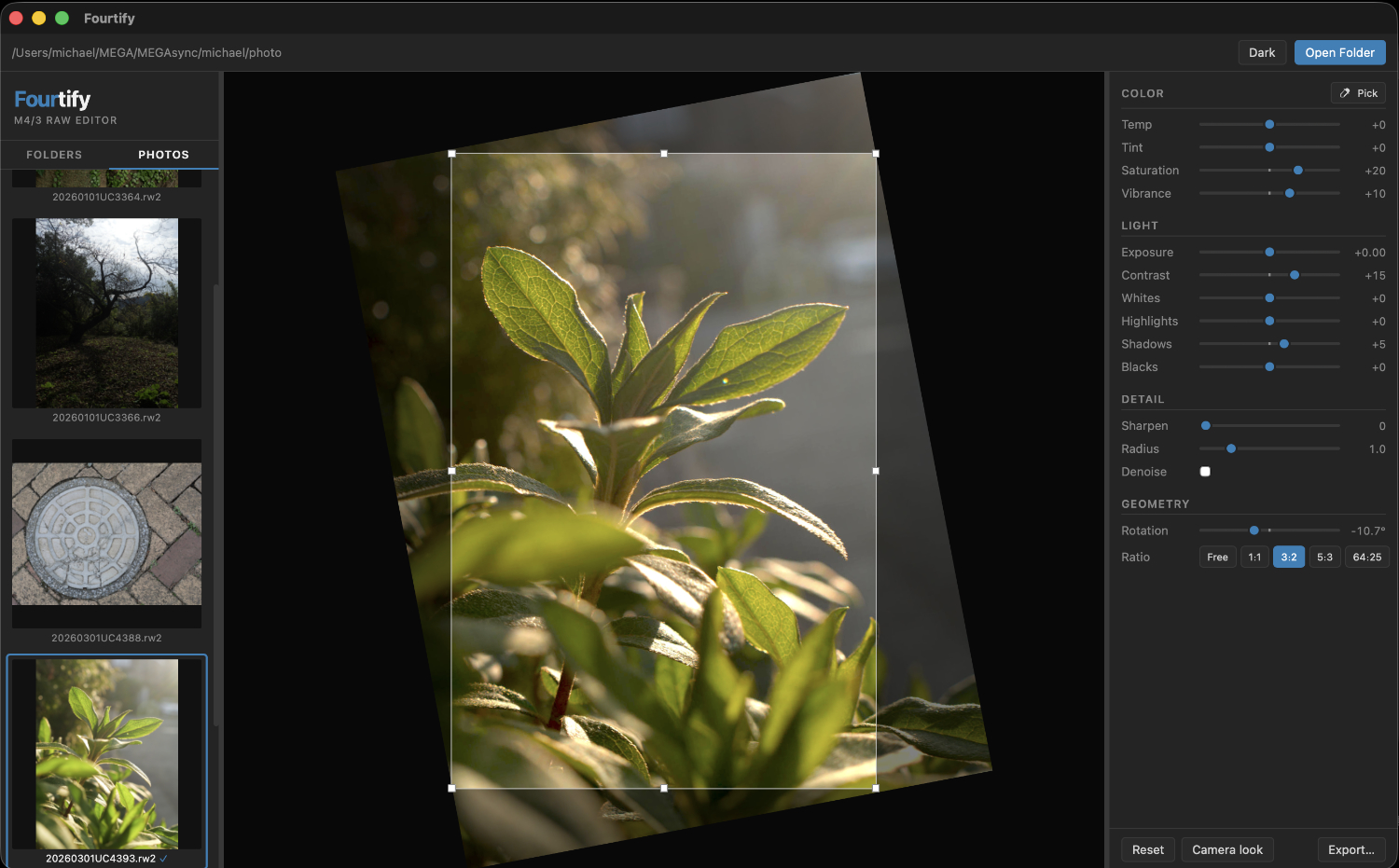
I'm working on a software project: a photo editor for micro-four-thirds RAW images.
Workflow
The name "Fourtify" says it all — it's a first-pass tool for m4/3 shooters. Four-thirds RAW in; TIF out: Fourtify! Cull a folder, apply tonal and color corrections, level/crop, export JPEGs for proofing or delivery, and only send the keepers into PhotoLab or Affinity for heavy work (lens corrections, masking, layers). It's the triage step that currently either doesn't exist or happens slowly inside a full DAM.
Non-destructive sidecars
All adjustments are stored in companion sidecar files. The RAW is never touched. Users who already have Photolab/Affinity sidecars won't conflict.
Processing fidelity for a "simple" tool
Even though it's lightweight, the pipeline does real work: linear-light tone processing (decode gamma → adjust → re-encode), Rec.709 luma weights for saturation/vibrance, bell-curve tonal zones, and bilinear rotation. The preview is numerically matched to the export.
Panasonic-specific details
I have been working with Panasonic and Olympus/OM System files as I develop this.- Roll-angle reading from MakerNote EXIF with a one-click Level button — useful for handheld telephoto work - The "Camera look" preset reconstructs the embedded JPEG tone/color rendering, so you can start from something familiar rather than a flat RAW.
Keyboard-first operation
Arrow keys to navigate, r/l to rotate 90°, e to open the export dialog, x to re-run the last export silently. Del for rapid culling, the mouse barely needs to move.
What it deliberately omits
This is worth being explicit about for that community: no DAM, no keyword/rating system, no lens correction, no spot healing, no layers. We already have Photolab for lens profiles and Affinity for compositing. What we're missing is a fast, accurate, local-first step before that.
Privacy / local-first
Fully offline, no telemetry, no subscription. A small binary.
FeaturesNavigation & UI
- Folder tree + thumbnail strip, arrow keys to navigate photos
- Session restore (last folder + photo on relaunch)
- Dark and green themes
- Resizable right panel
Editing (non-destructive sidecars)
- White balance (temp/tint) with eyedropper
- Exposure, Contrast, Highlights/Shadows/Whites/Blacks, Saturation, Vibrance
- Unsharp mask sharpening + Gaussian denoise
- Rotation slider + r/l 90° keys, camera tilt auto-detect with one-click Level
- Crop with pan + resize handles, ratio presets
- "Camera look" preset matching the embedded JPEG
Export
- JPEG and TIFF, optional long-edge resize, quality control
- 'e' key opens dialog, 'x' exports any photo with the same config, silently
- Export checkmark (✓) shown on thumbnail after export
Delete
- Delete key (or right-click context menu) → Move to Trash confirmation
Performance
- WebGL fragment shader for zero-latency slider feedback
- wgpu compute shader for GPU-accelerated RAW export
- CPU fallback if GPU unavailable